Summary

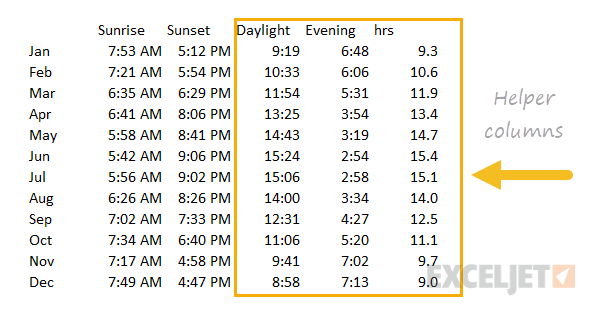
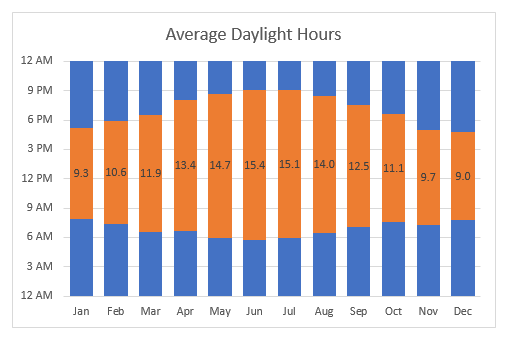
This chart is an example of a column chart that uses a "floating bar" technique to plot daylight hours on the chart in way that makes the bars look like the are floating above the horizontal axis. The trick in this case is to create three helper columns that do not exist in the original data: daylight, evening, and hrs. The video here walks through this process.

Original data
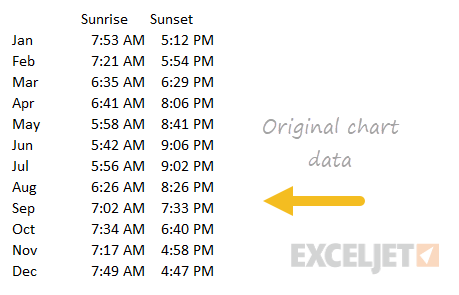
Original data for sunrise and sunset chart

Data with helper columns

Data with new helper columns

Support Exceljet

Many websites (including Exceljet) have lost over half their traffic in the past year because of the crushing impact of AI on web searches. Exceljet is still at it, publishing free content each week. If you find Exceljet helpful, you can support the site and go ad-free with the Exceljet Lifetime Pass. One payment, no subscription, and ads are gone forever. Plus, you get our Excel Shortcuts video course as a thank you.

Get the Lifetime Pass

Dave Bruns Profile Picture

AuthorMicrosoft Most Valuable Professional Award

Dave Bruns

Hi - I'm Dave Bruns, and I run Exceljet with my wife, Lisa. Our goal is to help you work faster in Excel. We create short videos, and clear examples of formulas, functions, pivot tables, conditional formatting, and charts.