Purpose
Raise a number to a power
Return value
Number raised to power
Syntax
=POWER(number, power)- number - Number to raise to a power.
- power - Power to raise number to (the exponent).
Microsoft docs
Using the POWER function
The POWER function returns a number raised to a given power. POWER is an alternative to the exponent operator (^) in a math equation.
The POWER function takes two arguments: number and power. Number should be a numeric value, provided as a hardcoded constant or as a cell reference. The power argument functions as the exponent, indicating the power to which number should be raised.
Examples
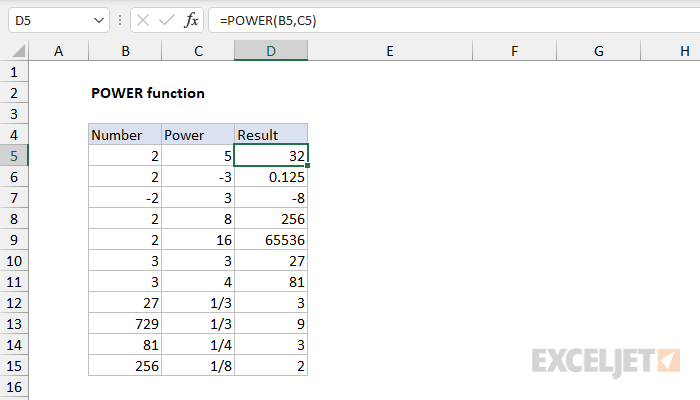
To raise 2 to the 3rd power, you can use POWER like this:
=POWER(2,3) // returns 8
To raise 2 to the 8th power:
=POWER(2,8) // returns 256
To cube the value in cell A1:
=POWER(A1,3) // cube A1
Fractional exponents
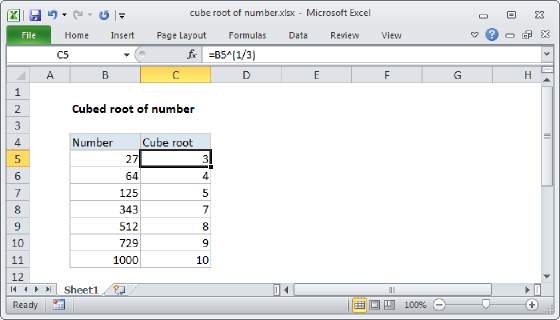
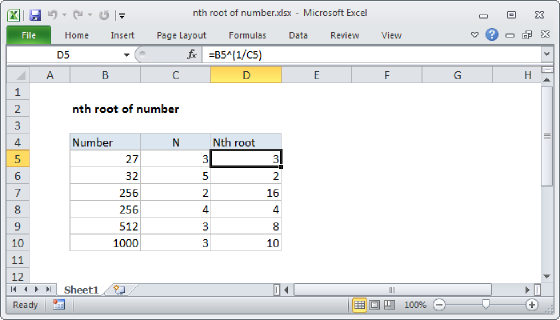
To use the power function with a fractional exponent, enter the fraction directly as the power argument:
=POWER(27,1/3) // returns 3
=POWER(81,1/4) // returns 3
=POWER(256,1/8) // returns 2
Exponent operator
In Excel, exponentiation can also be handled with the exponent (^) operator, so:
=2^2=POWER(2,2)=4
=2^3=POWER(2,3)=8
=2^4=POWER(2,4)=16