
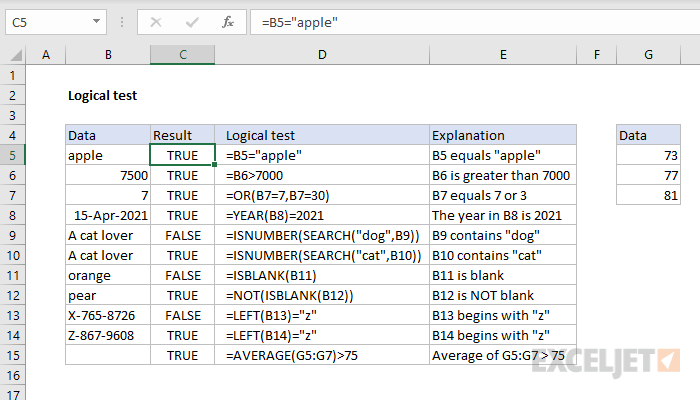
A logical test (also called a "logical expression) is an expression that returns either TRUE or FALSE. For example, to test if A1 equals "apple", you can use a formula like this:
=A1="apple" // returns TRUE or FALSE
To test if the value in A1 is between 5 and 10, you can use a formula like this:
=AND(A1>5,A1<10) // returns TRUE or FALSE
Logical tests in Excel formulas can be simple or quite complex, depending on the formula. Often, you will see several different logical tests in a single formula. In formulas that need to evaluate many cells at once, you will see logical tests that use Boolean logic.
Here are a few examples of formulas based on logical tests: