
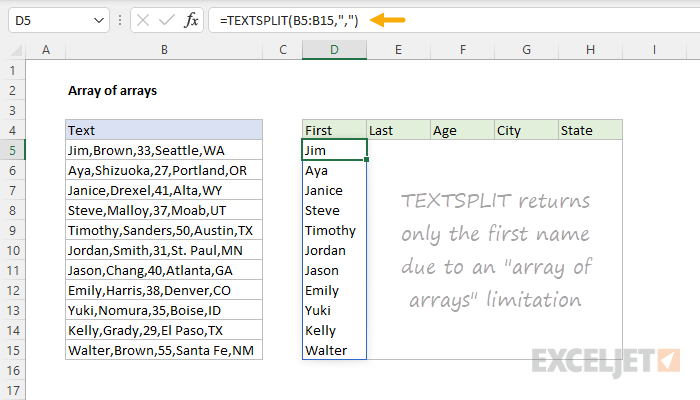
"Array of arrays" is a name for a limitation of Excel's calculation engine that can affect certain formulas that return multiple results. Excel's current formula engine will not return an "array of arrays" and the result may be a truncated version of the data (as in the example) or an error in some cases.
"Array of arrays" is not limited to the TEXTSPLIT function, but TEXTSPLIT is an easy way to see the limitation in action. When TEXTSPLIT is used on a single cell, it returns the text split by the delimiter in a single array whose values spill onto the worksheet into multiple cells. However, when you call TEXTSPLIT on a range of cells, TEXTSPLIT returns an array of results where each result is itself an array, creating an "array of arrays". As seen in the example shown, only the first name is returned in each row.
See this page for a workaround based on the REDUCE function. When you need one value per cell, like a count or a total of the parts, use the MAP function: see Count or sum values in each cell. When you want each list in its own row or column, use the MAKEARRAY function: see List names by group.