
=PDURATION(rate, pv, fv)- rate - Interest rate per period.
- pv - Present value of the investment.
- fv - Future value of the investment.
Using the PDURATION function
The PDURATION function calculates how much time is needed for an initial investment (present value) to reach a given amount (future value), assuming a constant annual interest rate. PDURATION returns an amount of time in periods, which is linked to the number of compounding periods per year. With one compounding period per year, periods = years. With 4 compounding periods per year, periods = quarters, and so on.
Note: the NPER function returns the number of periods for a series of cash flows (like a loan repayment schedule) whereas PDURATION returns the number of periods for a single sum to achieve a certain amount.
Example
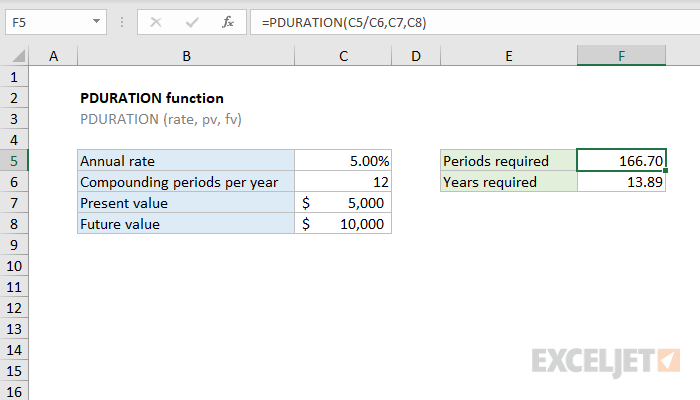
Assume you have $5,000 to invest at an annual rate of 5%. When interest is compounded monthly, how long will it take for the initial investment of $5,000 to reach $10,000? In the example shown, the formula in F5 is:
=PDURATION(C5/C6,C7,C8)
Notice because rate must be provided as interest rate per period, it is given here as the annual interest rate divided by the number of compounding periods per year (12). With these inputs, PDURATION returns 166.70 periods. Since interest is compounded monthly, periods correspond to months. To convert to years, the formula in F6 is:
=F5/C6