Summary
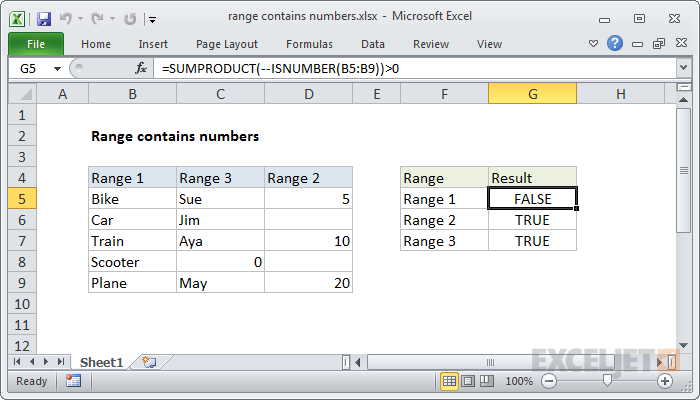
To test a range for numbers, you can use a formula based on the ISNUMBER and SUMPRODUCT functions. In the example shown, the formula in G5 is:
=SUMPRODUCT(--ISNUMBER(C5:C9))>0
Generic formula
=SUMPRODUCT(--ISNUMBER(range))>0
Explanation
Working from the inside out, the ISNUMBER function will return TRUE when given a number and FALSE if not. When you supply a range to ISNUMBER (i.e. an array), ISNUMBER will return an array of results. In the example, the range C5:C9 contains 5 cells, so the array returned by ISNUMBER contains 5 results:
{FALSE;FALSE;FALSE;TRUE;FALSE}
TRUE values represent numeric values.
We want to know if this result contains any TRUE values, so we use the double negative operator (--) to force the TRUE and FALSE values to 1 and 0 respectively. This is an example of boolean logic, and the result is an array of 1's and 0's:
{0;0;0;1;0}
We use the SUMPRODUCT function to sum the array:
=SUMPRODUCT({0;0;0;1;0})
Any sum greater than zero means at least one number exists in the range, so we use ">0" to force a final result of TRUE or FALSE.