
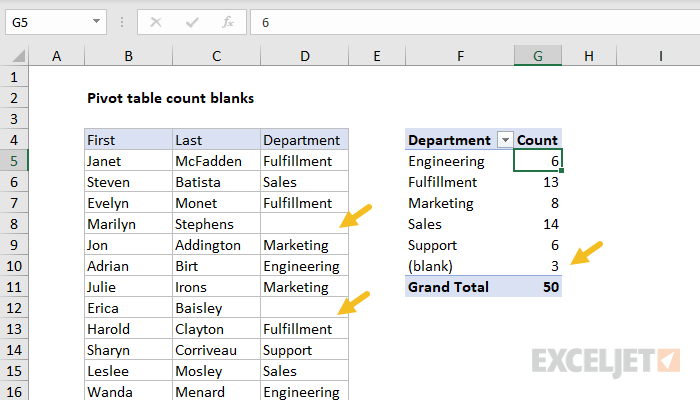
A pivot table is an easy way to count blank values in a data set. In the example shown, the source data is a list of 50 employees, and some employees are not assigned to a department. The Pivot Table is configured to group out data by department, and automatically creates a category called "(blank)" for employees without a department value.
Fields
The pivot table shown is based on three fields: First, Last, and Department. The Department field is configured as a Row field, and Last is configured as a Value field, renamed "Count".

The Last field is renamed "Count" and configured to summarize by count:

In the example shown, the pivot table uses the Last field to generate a count. Any text field in the data that is guaranteed to have data can be used to calculate count.
Steps
- Create a pivot table
- Add Department field to the rows area
- Add Last field Values area
Notes
- Any non-blank field in the data can be used in the Values area to get a count.
- When a text field is added as a Value field, Excel will display a count automatically.