Purpose
Get the sign of a number
Return value
One if positive. Negative one if negative. Zero if zero.
Syntax
=SIGN(number)- number - The number to get the sign of.
Microsoft docs
Using the SIGN function
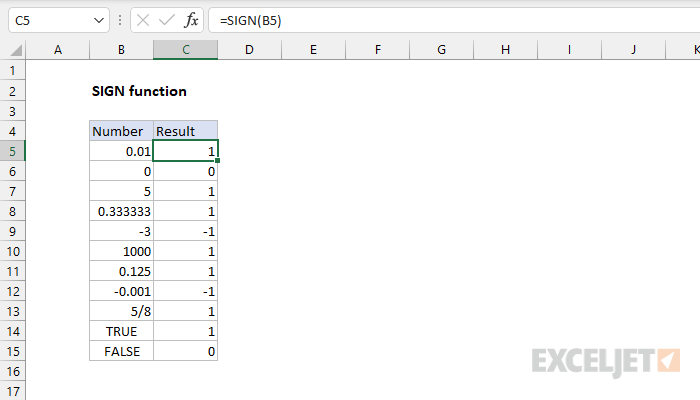
The SIGN function returns the sign of a number as +1, -1 or 0. If number is positive, SIGN returns 1. If number is negative, sign returns -1. If number is zero, SIGN returns 0.
The SIGN function takes one argument, number, which must be a numeric value. If number is not numeric, SIGN returns a #VALUE! error.
Examples
=SIGN(5) // returns 1
=SIGN(-3) // returns -1
=SIGN(0) // returns 0
SIGN can be used to change negative numbers into positive values like this. For example, with -3 in cell A1, the formula below returns 3:
=A1*SIGN(A1)
=-3*-1
=3
The formula above has no effect on positive numbers, since SIGN will return 1. However, the ABS function provides a simpler solution:
=ABS(A1) // absolute value of A1
Notes
- If number is in the range (-∞,0) SIGN(number) will return -1.
- If number is equal to 0 SIGN(number) will return 0.
- If number is in the range (0,∞)(number) SIGN will return 1.