=BIN2DEC(number)- number - The binary number you want to convert to decimal.
Using the BIN2DEC function
The BIN2DEC function converts a binary number to its decimal equivalent. The input must contain only zeros and ones and can be up to 10 characters (10 bits) long. Use BIN2DEC when working with binary data that needs to be read or calculated as an ordinary decimal number.
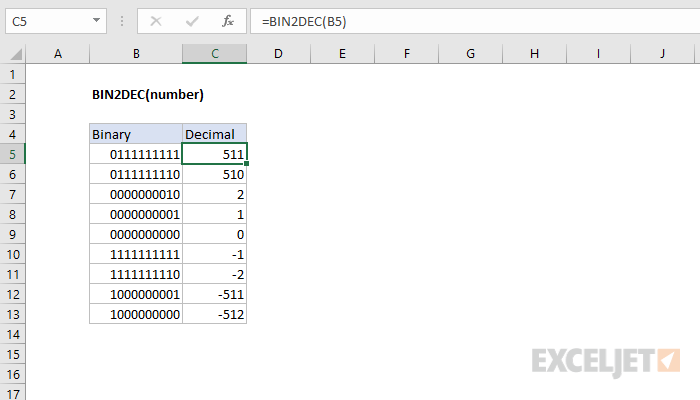
The first bit of the binary number indicates whether the number is positive or negative. The other nine digits represent the size of the number, the max of which is 511 (2^9 - 1). A negative binary number is expected to use the two's complement notation.
Examples
The formulas below show the BIN2DEC function with different inputs. The input can be entered as text or as a number made up of zeros and ones:
=BIN2DEC("1010") // returns 10
=BIN2DEC(111) // returns 7
=BIN2DEC("0111111111") // returns 511
=BIN2DEC("1000000000") // returns -512
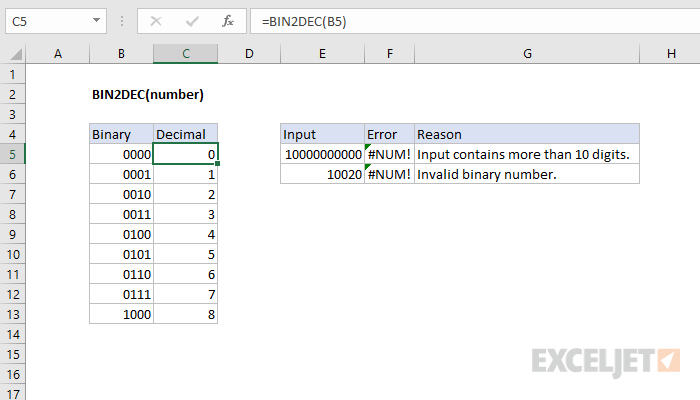
The worksheet below shows how BIN2DEC handles the full 10-bit input range, including negative numbers in two's complement notation: