
How to combine functions in a formula
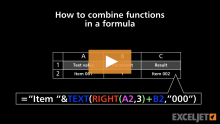
In this video you'll learn how to use multiple Excel functions to split, manipulate, and rejoin values inside a single formula.
...
The core of this formula uses the INDEX and MATCH function in a special way to return a full column instead of a single value. Working from the inside out, the MATCH function is used to find the correct column number for the fruit in I6:
MATCH(I6,C4:F4,0...Read moreAt the core, this formula extracts the number, adds the increment, and joins the number to the original text in the right format.
Working from the inside out, this formula first extracts the numeric portion of the string in column B using the RIGHT function:
...Read more
In this example, the goal is to display the top 3 values in C5:C16 that match a specific group, entered as a variable in cell F4. If the group is changed, the formulas should calculate new results. For convenience, group (B5:B16) and value (C5:C16) are...Read more
The goal is to look up the Title, Author, and Year in the list of books as shown using a formula based on a partial match and a wildcard. The text string to search for is entered in cell G4. All data is in an Excel Table named data in the range B5:D16. This problem can be easily solved with the...Read more
In this example, the goal is to count the maximum number of consecutive monthly orders. That is, we want to count consecutive monthly orders greater than zero. This is a tricky formula to understand, so buckle up!
They key to the formula is knowing that the...Read more
At a high level, this formula uses a nested IF function to return an array of holidays between two dates. This array is then processed by the TEXTJOIN function, which converts the array to text using a comma as the delimiter.
Working from the inside out, we generate the array of...Read more
In this example, the goal is to sum the numbers in column E when the item in column B appears in the range G5:G7. The named range things is not required. It is used only for convenience and can be expanded as needed to include additional criteria. The article below explains...Read more
At the core, this formula runs two tests on a value like this:
=D5>MIN(B5,C5) // is D5 greater than smaller?
=D5<MAX(B5,C5)) // is D5 less than larger?
In the first expression, the value is compared to the smaller of the two numbers,...Read more