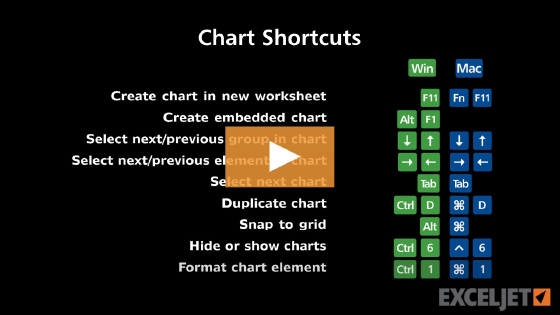
Windows Mac
AltF1 Fn⌥F1

About This Shortcut 

This shortcut will create and insert a chart using data in current range as an embedded object in the current worksheet.

Note: the Mac shortcut does not seem to be working on current versions of OS X and Excel 2011. One reason might be that Option + F1 activates Display Preferences. However, this shortcut does not appear under System Preferences > Keyboard > Keyboard Shortcuts so it's not clear how to disable it and also not certain that disabling it would solve the problem.

Do you know a workaround? Let us know.
Support Exceljet

Many websites (including Exceljet) have lost over half their traffic in the past year because of the crushing impact of AI on web searches. Exceljet is still at it, publishing free content each week. If you find Exceljet helpful, you can support the site and go ad-free with the Exceljet Lifetime Pass. One payment, no subscription, and ads are gone forever. Plus, you get our Excel Shortcuts video course as a thank you.

Get the Lifetime Pass

Dave Bruns Profile Picture

AuthorMicrosoft Most Valuable Professional Award

Dave Bruns

Hi - I'm Dave Bruns, and I run Exceljet with my wife, Lisa. Our goal is to help you work faster in Excel. We create short videos, and clear examples of formulas, functions, pivot tables, conditional formatting, and charts.