Summary
Coast FI (also called Coast FIRE) is the point where the money you have already invested will grow into a full retirement fund on its own, with no more contributions. To calculate a Coast FI number in Excel, you can use the PV function. In the example shown, the formula in C14 is:
=PV(C7,C13,0,-C12)
where C12 contains the retirement target (the "FI number") and C13 contains the years until retirement. With the inputs shown, PV returns $140,494. This is the amount that will grow to $1,500,000 in 35 years at 7% per year. The worksheet works as a simple Coast FIRE calculator in Excel: change any input in C5:C9 and the FI number and Coast FI number update automatically. See below for how to check whether you are on track, how many years of saving remain, and how much to save each year.
I'm not a financial advisor, and this page is not financial advice. The goal is to show how a problem like this can be modeled in Excel with the built-in financial functions.
Generic formula
=PV(rate,years,0,-target)
Explanation
Coast FI is a milestone on the way to retirement, and it has become a popular topic with younger savers. The name comes from the FIRE movement (Financial Independence, Retire Early), where "FI" is short for financial independence. The idea is simple: if you invest enough money early, compound growth alone will carry that balance to your retirement target by the time you retire, and you can stop contributing and "coast". The Coast FI number is the balance you need today for that to happen. It depends on three things: the amount you want to have at retirement, the number of years until retirement, and the rate of return you expect along the way.
In this example, the goal is to calculate a Coast FI number from a set of inputs in the range C5:C9. The worksheet also calculates the retirement target and the years until retirement in C12 and C13, so the main formula stays simple. After the main formula, the sections below show three related calculations built with the same inputs: a check with the FV function to see if a current balance is on track, the NPER function to calculate how many more years of saving are needed, and the PMT function to calculate the annual contribution needed to reach Coast FI by a certain point.
None of the sheets in the workbook are linked together; they all function independently. It is possible to build a more integrated model in Excel, but I wanted to keep each worksheet as simple as possible.
Table of contents
- Setting up the worksheet
- The FI number
- The Coast FI number
- Why the PV function?
- Are you on track?
- Years until you can coast
- Contribution needed to coast
- Inflation and the rate of return
- Summary
Setting up the worksheet
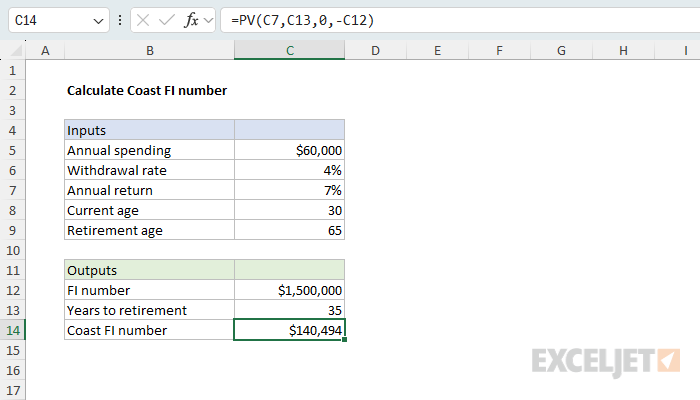
The worksheet has five inputs in the range C5:C9 and three outputs in the range C12:C14. The inputs are typical of the assumptions used in Coast FI calculators:
| Input | Description | Example |
|---|---|---|
| Annual spending | What you expect to spend each year in retirement | $60,000 |
| Withdrawal rate | The share of the portfolio withdrawn each year in retirement | 4% |
| Annual return | The expected growth rate after inflation | 7% |
| Current age | Your age now | 30 |
| Retirement age | The age at which you plan to retire | 65 |
The withdrawal rate of 4% comes from the 4% retirement rule, a common guideline for how much can be withdrawn from a portfolio each year in retirement. Keep in mind that the classic 4% rule was designed for a 30-year retirement. If you plan to retire early and expect a retirement of 40 years or more, a lower withdrawal rate (which gives a larger FI number) may be safer. The annual return of 7% is a common assumption for a diversified stock portfolio after inflation. See the notes on inflation below.
The FI number
The FI number (short for "financial independence") is the total amount you need to have invested at retirement. It is calculated by dividing annual spending by the withdrawal rate. The formula in C12 is:
=C5/C6
With annual spending of $60,000 and a withdrawal rate of 4%, the result is $1,500,000. This is the same as multiplying annual spending by 25, since 1/4% = 25. The number of years until retirement is calculated in C13 by subtracting the current age from the retirement age:
=C9-C8
With a current age of 30 and a retirement age of 65, the result is 35 years.
The Coast FI number
The Coast FI number is the amount that must be invested today so that it grows to the FI number by the retirement age, with no further contributions. In other words, we want to know the present value of the FI number, discounted back over 35 years at 7% per year. This is a job for the PV function, which returns the present value of an investment given a rate, a number of periods, and a future value. The formula in C14 is:
=PV(C7,C13,0,-C12)
The arguments are configured like this:
- rate is the annual return in C7, 7%.
- nper is the years until retirement in C13, 35.
- pmt is zero, since there are no contributions along the way.
- fv is the FI number in C12, entered as a negative number.
With these inputs, PV returns $140,494. In other words, if you invest this amount today and earn 7% per year, you will have $1,500,000 in 35 years without adding another dollar.
The FI number is entered as a negative value because of the sign convention used by Excel's financial functions: money you pay out is negative and money you receive is positive. Since we want the result to appear as a positive number, we make the future value negative. If you leave the future value positive, PV returns the same number with a negative sign.
Tip: If you have the FI number and the years to retirement available as inputs directly, you can use a simpler version of the formula: =PV(rate,years,0,-target).
Why the PV function?
Note that we don't have to use the PV function to solve this problem. The Coast FI number is just the FI number divided by the growth factor for the years until retirement, so the same result can be calculated with a simple formula:
=C12/(1+C7)^C13
This formula divides the FI number by (1+7%)^35, which is about 10.68, and returns $140,494. It is the same calculation that PV performs internally when there are no periodic payments. The PV function is still a good choice because it makes the intent of the formula clear and because the arguments (rate, periods, payment, future value) are the same ones used by the FV, NPER, and PMT functions in the sections below.
Are you on track?
Once you know your Coast FI number, the obvious question is whether your current balance has reached it. One way to check is to compare the current balance to the Coast FI number. Another way is to project the current balance forward to the retirement age with the FV function and compare the result to the FI number. In the worksheet below, the inputs are the same as before, with a current balance of $95,000 added in C5 and the years to retirement entered directly as 35. The FI number is calculated in C12 as before, and the formula in C13 is:
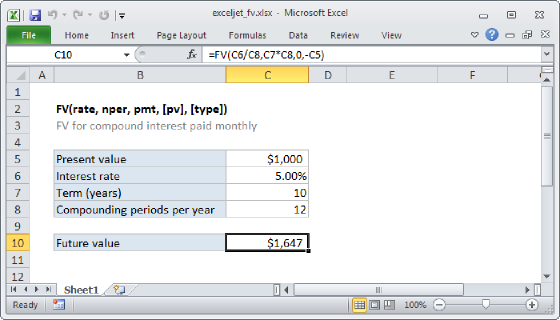
=FV(C8,C9,0,-C5)
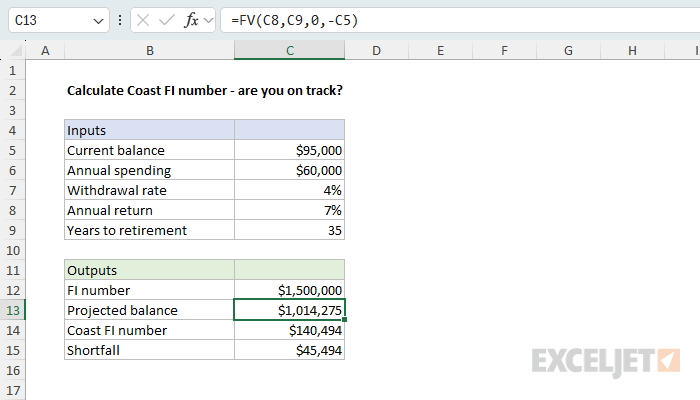
The FV function returns the future value of an investment. Here, the rate is 7%, the number of periods is 35, there is no periodic payment, and the present value is the current balance of $95,000, entered as a negative number. FV returns $1,014,275, which is short of the $1,500,000 target. The Coast FI number is calculated in C14 with the same PV formula as before:
=PV(C8,C9,0,-C12)
and the shortfall is calculated in C15 by subtracting the current balance from the Coast FI number:
=C14-C5
The result is $45,494. What this says is that the balance needs to increase by another $45,494 in today's dollars before it will grow on its own to reach the Coast FI number. A negative result means the balance is already past the goal.
Years until you can coast
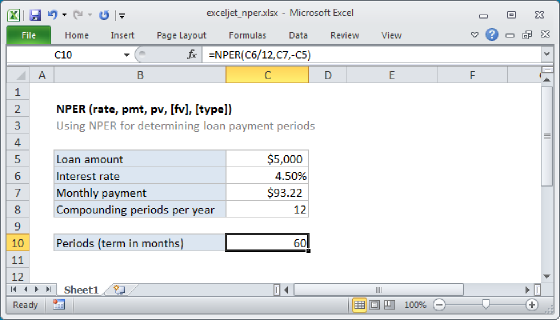
If the current balance is below the Coast FI number, the next question is how long it will take to get there with regular contributions. This is a little tricky, because the target moves as time passes: each year that goes by, there is one less year for the money to grow, so the Coast FI number rises. One way to sidestep the problem is to compare both in today's dollars, instead of comparing the balance to the Coast FI number at some future date. The shortfall calculated above is the gap between the current balance and the Coast FI number today, and each contribution closes part of that gap. This means we can model the shortfall like a loan and ask how many payments it takes to pay it off, a perfect job for the NPER function. In the worksheet below, the inputs are a current balance of $95,000, an annual contribution of $12,000, an annual return of 7%, 35 years until retirement, and an FI number of $1,500,000. The formula in C14 is:
=NPER(C7,-C6,C13)
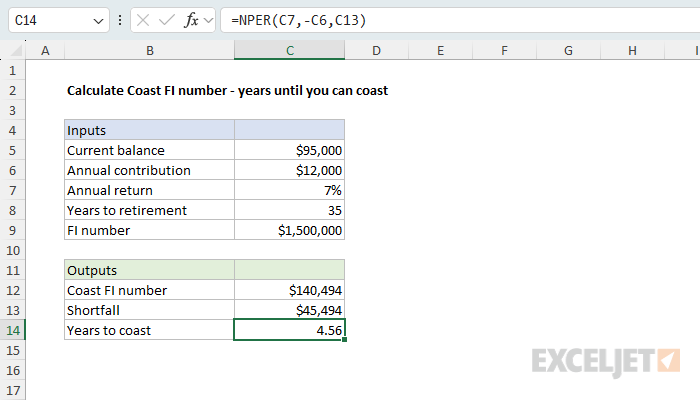
The NPER function returns the number of periods for a loan or investment. The rate is 7%, the payment is the annual contribution of $12,000 (negative, because it is money paid out), and the present value is the shortfall in C13, calculated as before by subtracting the current balance from the Coast FI number in C12. NPER returns 4.56, which means that the balance will have caught up to the Coast FI number in about four and a half years of contributions.
To see why this works, think about where the money ends up at retirement. Every dollar in the account today grows for 35 years. A dollar contributed in year 3 grows for 32 years, which is the same as a smaller amount invested today and growing for 35 years. Discounting each contribution back to today puts everything on the same footing, and the shortfall is the amount those discounted contributions need to add up to. After 4.56 years both the balance and the Coast FI number will be about $191,249 with 30.44 years left to retirement.
Contribution needed to coast
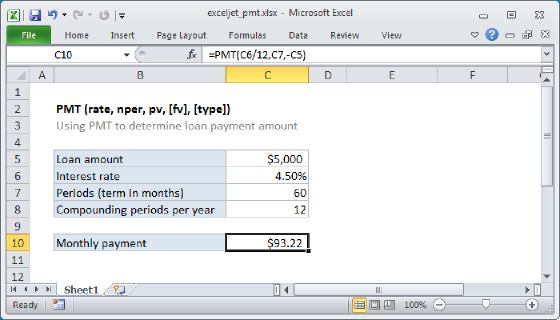
The last question is the reverse of how many years until you can coast: if you want to reach Coast FI in a certain number of years, how much do you need to contribute each year until then? The same idea applies. The shortfall is a loan to be paid off in a set number of payments, and the PMT function calculates the payment. In the worksheet below, the inputs are a current balance of $95,000, an annual return of 7%, 35 years until retirement, an FI number of $1,500,000, and a goal of reaching Coast FI in 10 years. The formula in C14 is:
=PMT(C6,C9,-C13)
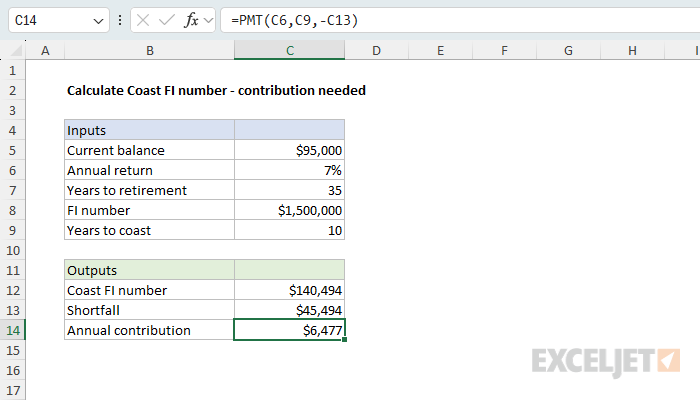
The PMT function returns the periodic payment for a loan or investment. The rate is 7%, the number of periods is the 10 years in C9, and the present value is the shortfall in C13, entered as a negative number so that the result is positive. PMT returns $6,477. In other words, if you contribute $6,477 each year for 10 years, the balance will reach the Coast FI number at age 40, after which no further contributions are needed to reach $1,500,000 at age 65.
To get a rough monthly figure, divide the result by 12. For a more precise monthly calculation, use a monthly rate (the annual rate divided by 12) and a monthly number of periods (years times 12) throughout the worksheet, as explained in Monthly savings needed to reach goal.
Inflation and the rate of return
The rate of return you use matters a lot in this calculation, because it compounds over a long period. At 7%, the Coast FI number in the example is $140,494. At 5%, it is $271,923, almost twice as much. There is also a subtle point about inflation. The FI number of $1,500,000 is based on spending $60,000 per year in today's dollars. If you use a nominal return (the return before inflation), the Coast FI number will grow to $1,500,000 in future dollars, which will buy less than $1,500,000 today. To keep everything in today's dollars, use a real return, which is the expected return minus expected inflation. So, if you assume a nominal return of 10%, and inflation at 3%, the real return is about 7%, which is what we use in this example. Most Coast FI calculators work this way, though some ask for the return and inflation separately and do the subtraction for you.
None of these formulas account for taxes, fees, or changes in spending, and they assume the same return every year, which never happens in practice. The calculated results are useful for planning, but they are not a guarantee.
Summary
The Coast FI number is the present value of a retirement target, and Excel's financial functions handle every part of the problem:
- Divide annual spending by the withdrawal rate to get the FI number (the same as multiplying by 25 at a 4% withdrawal rate).
- Use PV with the rate, the years to retirement, no payment, and the FI number as a negative future value to get the Coast FI number.
- Use FV to project a current balance to retirement and see if it reaches the FI number.
- The shortfall (Coast FI number minus current balance) behaves like a loan. Use NPER to get the years of contributions needed to pay it off, and PMT to get the contribution needed to pay it off in a set number of years.
- Use a real (after-inflation) return to keep the results in today's dollars.
To see how the 4% withdrawal rate plays out after retirement, year by year, see Modeling the 4 percent retirement rule in Excel.