

Summary
Combinations and permutations are two basic ways to count possibilities, used in probability, statistics, games, passwords, and lotteries. This article explains the difference between them, when order and repetition matter, and the Excel functions you can use to calculate each case: FACT, PERMUT, PERMUTATIONA, COMBIN, and COMBINA.
You walk into an ice cream shop with 10 flavors and order a 3-scoop cone. You can repeat flavors if you like (three scoops of chocolate is fine), but the order of the scoops doesn't matter. How many different combinations are possible? In Excel, we can answer this question with the COMBINA function, using a formula like this:
=COMBINA(10,3) // returns 220
The result is 220 possible combinations! But how did we know to use COMBINA and not another function like COMBIN or PERMUT? The answer is that we need to follow some simple rules. This article explains the difference between a combination and a permutation and how to decide which Excel function makes sense in your particular situation.
Table of Contents
- Combinations vs. permutations
- Factorials
- Variable names
- Permutations without repetition
- Combinations without repetition
- Permutations with repetition
- Combinations with repetition
- Real-world examples
- Why the numbers grow so fast
- From counting to listing
- Conclusion
Combinations vs. permutations
Combinations and permutations are two ways to count possibilities. Both are used when selecting items from a larger set, but they answer different questions. A combination counts selections where order does not matter, like choosing people for a committee. A permutation counts arrangements where order does matter, like assigning first, second, and third place in a race:
- A combination is a selection where order does not matter.
- A permutation is an arrangement where order does matter.
If you are choosing people for a committee, the order you list the names does not matter. This is a combination. If you are assigning gold, silver, and bronze medals, order definitely matters. This is a permutation.
The terminology is confusing
This terminology is confusing partly because of the way the word "combination" is used in everyday language. For example, people often talk about a "combination lock." But combination locks actually require the numbers in a specific order. If the "combination" for a lock is:
12 - 25 - 4
Then you can't open the lock with:
25 - 12 - 4
In mathematical terms, these are permutations, not combinations, because order matters. The same is true of passwords, PINs, passcodes, locker codes, and so on. In ordinary speech, we often call these "combinations," but mathematically they are permutations. This distinction doesn't matter in everyday conversation because people know what you're talking about. However it does matter if you want to calculate combinations or permutations in Excel.
Factorials
The formulas used to calculate combinations and permutations are directly connected to factorials. A factorial is the product of a whole number and all the positive whole numbers below it. It is written with an exclamation point, like 3!, which is pronounced "three factorial". Three factorial is calculated like this:
3! = 3 × 2 × 1 = 6
Here are the factorials for four, five, and six:
4! = 4 × 3 × 2 × 1 = 24
5! = 5 × 4 × 3 × 2 × 1 = 120
6! = 6 × 5 × 4 × 3 × 2 × 1 = 720
Factorials appear in combination and permutation formulas because these formulas are based on counting arrangements. For example, if you have 5 books and want to arrange all 5 on a shelf, there are 120 possible arrangements which you can calculate like this:
5 × 4 × 3 × 2 × 1 = 120
There are 5 choices for the first position, then 4 choices left for the second position, then 3 choices left for the third position, and so on.
In Excel, you use the FACT function to calculate a factorial. For example:
=FACT(3) // returns 6
=FACT(4) // returns 24
=FACT(5) // returns 120
=FACT(6) // returns 720
You can see how this works in the worksheet below, where the formula in D5 is:
=FACT(B5)
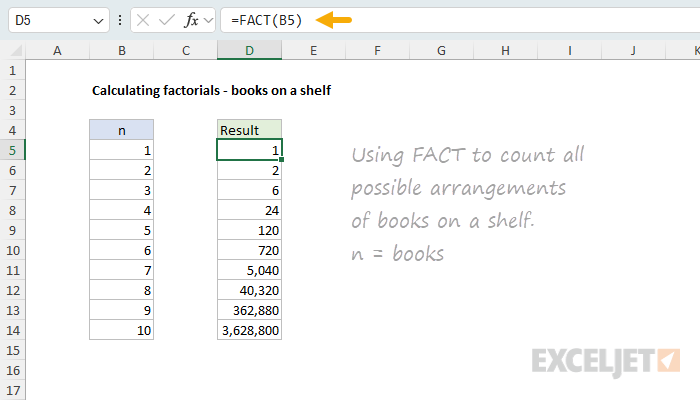
Notice that 10! (ten factorial) is 3,628,800. In other words, 10 books on a shelf can be arranged in 3,628,800 different ways! Factorials grow very quickly, which is part of why combination and permutation counts get large so fast. The equivalent formula for 10 books on a shelf with the PERMUT function is:
=PERMUT(10,10) // returns 3,628,800
In other words, this counts the number of ways to arrange all 10 items, which is the same as 10!.
Variable names
Before we discuss the formulas used to calculate possibilities, we need to introduce two variables commonly used for combinations and permutations:
n = the total number of items available
r = the number of items selected or arranged
For example, if you have 10 people and you want to choose 3 of them:
n = 10
r = 3
Depending on the situation, you might be asking one of two different questions:
- Combination: How many groups of 3 can I choose from 10 people?
- Permutation: How many ordered arrangements of 3 can I make from 10 people?
These sound similar, but they give different answers.
Permutations without repetition
A permutation counts arrangements where order matters. For example, suppose there are 10 runners in a race, and you want to know how many possible ways there are to award 1st, 2nd, and 3rd place. There are:
- 10 choices for 1st place
- 9 choices for 2nd place
- 8 choices for 3rd place
This is a permutation because order matters. Alice, Juan, and Kate finishing in that order is different from Kate, Juan, and Alice finishing in that order. The formula for permutations without repetition is:
P(n,r) = n! / (n-r)!
In this case n is the total number of people (10) and r is the number of finishing positions (3). Using n = 10 and r = 3:
P(10,3) = 10! / (10-3)!
P(10,3) = 10! / 7!
Since most of the factorial terms cancel out, this becomes:
10 × 9 × 8 = 720
So there are 720 possible ordered results.
Excel has a dedicated function for this calculation, PERMUT. The first argument is number (n, the total number of items) and the second is number_chosen (r, the number chosen):
=PERMUT(10,3) // returns 720
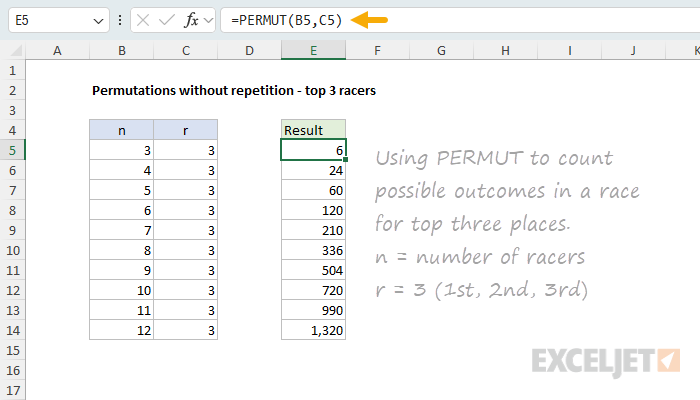
You can see how the permutation count changes as we increase the number of racers while keeping the number of top places fixed at three in the worksheet below. The formula in E5, copied down, is:
=PERMUT(B5,C5)
Combinations without repetition
A combination counts selections where order does not matter. Suppose you have 10 people and want to choose 3 people for a committee. This is different from the race example. If Gwen, Max, and Angela are selected, it does not matter whether we list them as: Gwen, Max, Angela or Angela, Gwen, Max. It is the same committee.
The formula for combinations without repetition is:
C(n,r) = n! / (r!(n-r)!)
Using n = 10 and r = 3:
C(10,3) = 10! / (3! × 7!)
This simplifies to:
(10 × 9 × 8) / (3 × 2 × 1)
720 / 6 = 120
So there are 120 possible groups of 3 people.
Excel calculates this with the COMBIN function, which takes the same two arguments, n and r:
=COMBIN(10,3) // returns 120
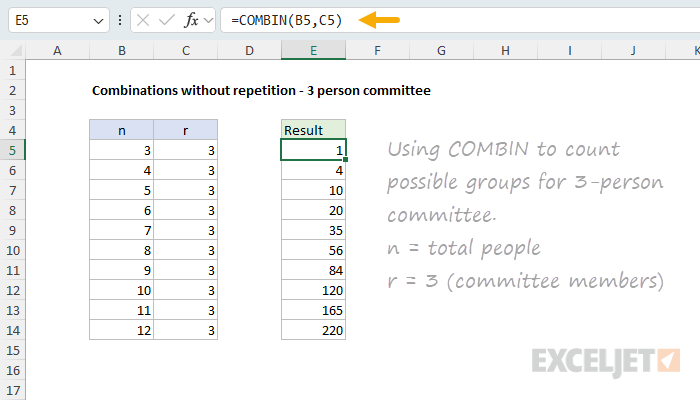
You can see how the combination count changes as we increase the number of people while keeping the number of committee members at three in the worksheet below. The formula in E5, copied down, is:
=COMBIN(B5,C5)
Why combinations are smaller than permutations
For the same values of n and r, the number of combinations is always smaller than the number of permutations, because combinations ignore order. In the example above:
=PERMUT(10,3) // returns 720
=COMBIN(10,3) // returns 120
Why the difference? Each group of 3 people can be arranged in 6 orders (3!), as explained earlier:
=FACT(3) // returns 6
So the permutation count is 6 times larger:
120 × 6 = 720
In other words, the combination formula divides by r! to remove the duplicate arrangements that do not matter.
Permutations with repetition
So far we have looked at permutations and combinations assuming that items cannot be repeated. A person can sit on a committee only once, and a runner can finish in only one position. But repetition is the second question to ask, and it changes the count. A permutation with repetition is an ordered arrangement where items can be reused.
A common example is a 3-digit code using the digits 0-9. Codes like these are allowed: 123, 321, 111, 909. Order matters, but repetition is allowed. There are 10 choices for the first digit, 10 choices for the second digit, and 10 choices for the third digit:
10 × 10 × 10 = 1,000
The formula is:
n^r
Using n = 10 and r = 3:
10^3 = 1,000
In Excel you can calculate this directly as a power, or use the PERMUTATIONA function, which counts permutations when repetition is allowed:
=10^3 // returns 1000
=PERMUTATIONA(10,3) // returns 1000
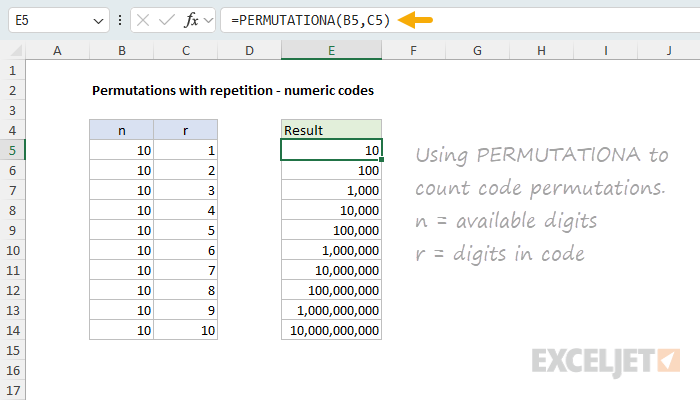
You can see how the permutation count rapidly increases as we increase the number of digits in the code (with 10 digits available for each position) in the worksheet below. The formula in E5, copied down, is:
=PERMUTATIONA(B5,C5)
Combinations with repetition
A combination with repetition is a selection where order does not matter, but items can be repeated.
A classic example is choosing 3 scoops of ice cream from 10 flavors, where you are allowed to repeat flavors. For example, these are possible selections:
Vanilla, Chocolate, Strawberry
Vanilla, Vanilla, Chocolate
Chocolate, Chocolate, Chocolate
Order does not matter, but repetition is allowed.
The formula is:
C(n+r-1,r)
Using n = 10 flavors and r = 3 scoops:
C(10+3-1,3) = C(12,3)
C(12,3) = 220
So there are 220 possible selections.
Excel handles this with the COMBINA function, which counts combinations when repetition is allowed. The arguments are still n and r:
=COMBINA(10,3) // returns 220
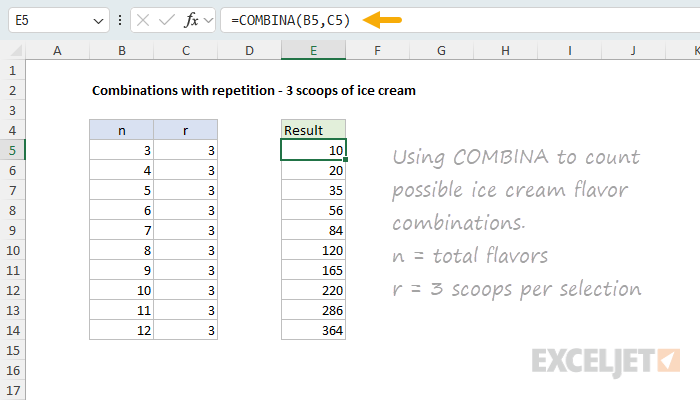
You can see how the count grows as we increase the number of flavors while keeping the number of scoops fixed at three in the worksheet below. The formula in E5, copied down, is:
=COMBINA(B5,C5)
Note: This type of problem is sometimes called "combinations with replacement" or "combinations with repetition."
I don't know what the "A" in COMBINA and PERMUTATIONA means. My guess is that it comes from the OpenFormula standard that Excel 2013 aligned with, where these are the names for the repetition-allowed versions of COMBIN and PERMUT. Either way, a simple mnemonic is that the "A" signals that repetition is Allowed. Let me know if you have better information.
Real-world examples
Choosing a committee
Suppose a club has 20 members and needs to choose 4 people for a planning committee. Order does not matter. A committee with Anna, Ben, Claire, and David is the same committee no matter how the names are listed. This is a combination without repetition:
=COMBIN(20,4) // returns 4845
Awarding medals
Suppose 20 runners are competing, and you want to know how many different ways gold, silver, and bronze medals can be awarded. Order matters: gold, silver, and bronze are different outcomes. This is a permutation without repetition:
=PERMUT(20,3) // returns 6840
Creating a PIN
Suppose a 4-digit PIN can use the digits 0-9, and digits can repeat. Order matters (the PIN 1234 is different from 4321) and repetition is allowed (the PIN 1111 is valid). This is a permutation with repetition:
=PERMUTATIONA(10,4) // returns 10000
=10^4 // returns 10000
Choosing pizza toppings
Suppose a pizza shop offers 12 toppings, and you can choose any 4 different toppings. Order does not matter: pepperoni, mushrooms, olives, and onions are the same toppings no matter how they are listed. This is a combination without repetition:
=COMBIN(12,4) // returns 495
If the shop allowed you to choose the same topping more than once, it would become a combination with repetition (less common for pizza, but valid):
=COMBINA(12,4) // returns 1365
Lottery numbers
Many lotteries ask you to choose a set of numbers. In a typical drawing, order does not matter. If the winning numbers are:
4, 12, 18, 27, 35
then a ticket with the same numbers in a different order is still a winner. Suppose the game asks you to choose 5 numbers from 1 to 45. This is a combination without repetition (assuming each number can be chosen only once):
=COMBIN(45,5) // returns 1,221,759
Passwords
Passwords are usually permutations with repetition. Order matters: cat123 is different from 123cat. Repetition is usually allowed: bookkeeper99 contains repeated letters and numbers.
Because passwords often use many possible characters and allow repetition, the number of possibilities grows very quickly. For example, a 6-character password built from 36 characters (the 26 lowercase letters a-z plus the 10 digits 0-9) has over 2 billion possible values:
=PERMUTATIONA(36,6) // returns 2,176,782,336
Why the numbers grow so fast
One of the most interesting things about combinations and permutations is how quickly the counts can become large. For example, a 4-digit code using digits 0-9 has 10,000 possible values, and a 6-digit code has 1,000,000:
=10^4 // returns 10,000
=10^6 // returns 1,000,000
Adding just two more digits increases the number of possibilities by 100 times. This kind of rapid growth is one reason permutations are important in security, cryptography, games, and probability.
From counting to listing
The functions above (FACT, PERMUT, PERMUTATIONA, COMBIN, and COMBINA) all answer the same kind of question: how many? They return a count. What they cannot do is produce the actual items: the list of every code, every arrangement, or every combination. To go from counting to listing, Excel's dynamic array functions can generate the actual items, not just count them:
- List all combination lock codes generates every possible code for several different kinds of locks (a permutation with repetition).
- List all permutations of a list lists every arrangement of a set of items, where order matters.
- List all combinations lists every selection where order does not matter, with or without repeats.
- List all combinations from multiple lists combines one item from each of several lists (a cross join), like sizes, colors, and styles.
Conclusion
Combinations and permutations are easy to mix up because everyday language does not always match the mathematical definitions. In ordinary conversation, people often use "combination" to mean any code, arrangement, or selection. In math, the meaning is more specific. When you see a counting problem, ask yourself these questions:
- Does order matter?
- Can items repeat?
Then choose the matching concept:
- If order matters, think permutation.
- If order does not matter, think combination.
Then choose the matching Excel function based on whether repetition is allowed. The table below summarizes your options in Excel:
| Type | Order matters? | Repetition allowed? | Formula | Excel function |
|---|---|---|---|---|
| Permutation without repetition | Yes | No | P(n,r) = n! / (n-r)! | PERMUT(n,r) |
| Permutation with repetition | Yes | Yes | n^r | PERMUTATIONA(n,r) |
| Combination without repetition | No | No | C(n,r) = n! / (r!(n-r)!) | COMBIN(n,r) |
| Combination with repetition | No | Yes | C(n+r-1,r) | COMBINA(n,r) |
The most important distinction is still whether order matters. Repetition is the second question. Each of the four cases has a matching Excel function, shown in the last column. The FACT function, for factorials, is the building block behind several of these formulas.